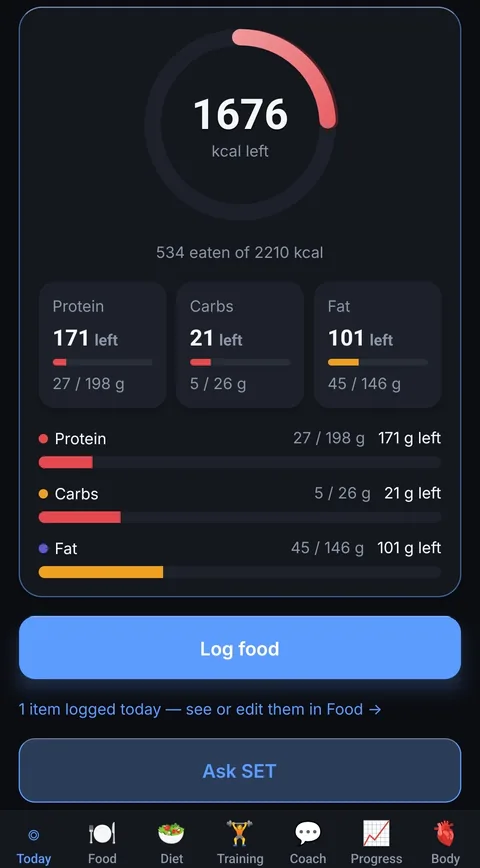
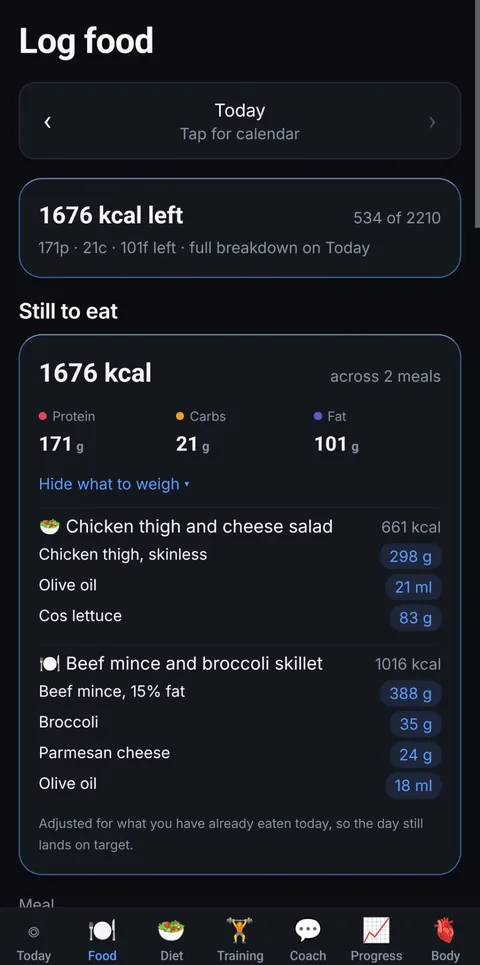
Every tracker can tell you that 1,676 calories are left. Setpoint tells you that dinner is
298 g of chicken thigh, 21 ml of olive oil and 388 g of mince — and when lunch runs over,
it resizes the rest of the day so you still land on the number.
The target underneath it is learnt from your own weight trend and what you actually eat,
not guessed from your height and age.
Android today. iPhone in progress.
It is the same app, so it is a question of when, not whether —
tell us where to send the link.
The difference in one screen
Every tracker knows the number. One of them cooks with it.
Every other tracker
1,676 kcal left
Now work out what that is in food, weigh it, and hope you got it right.
Setpoint
1,676 kcal left
Chicken thigh298 g
Olive oil21 ml
Cos lettuce83 g
Beef mince388 g
Broccoli35 g
Parmesan24 g
Ate something that was not in the plan? Log it. The remaining meals resize so the day still
lands on your target, protein first, and the new weights are on screen before you have put
the phone down. That is the whole product — the rest of this page is how it knows what your
target should be.
AI identifies. The database calculates.
Setpoint never asks a model to invent a calorie figure. It identifies the food in a photo
or a sentence and estimates the portion; every macro number comes from a nutrition
database. When nothing matches, the item is flagged as an estimate rather than quietly
counted as fact.
🇦🇺 Built around Australian food
Whole foods come from the Food Standards Australia New Zealand database — the cuts sold
here, with entries that say raw, baked, fried or casseroled. Weighing cooked chicken
against raw figures undercounts you by nearly a fifth, and most apps never say which one
you are looking at.
The app itself
Today
What is left, against a target worked out from your own data rather than a formula.
Still to eat
Not “1,676 left” — 298 g of chicken thigh, 21 ml of olive oil, 388 g of mince. Already adjusted for what you have eaten today.
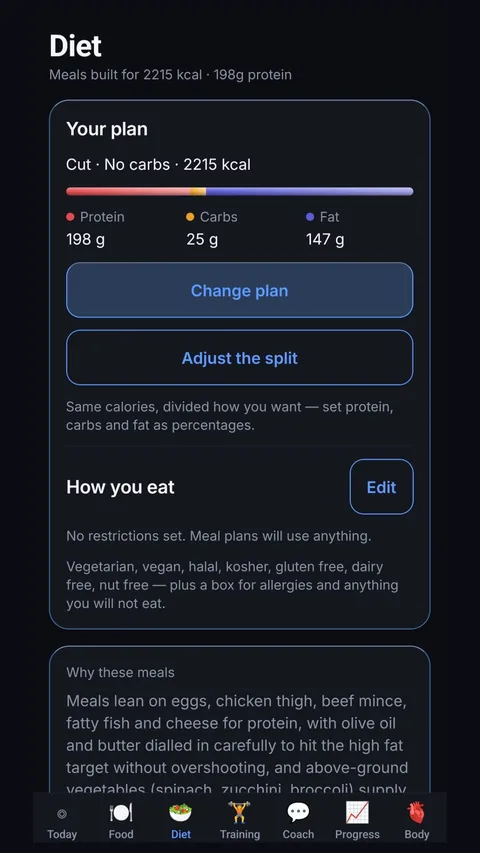
Diet
Meals built to your exact numbers, with a shopping list and a weekly budget.
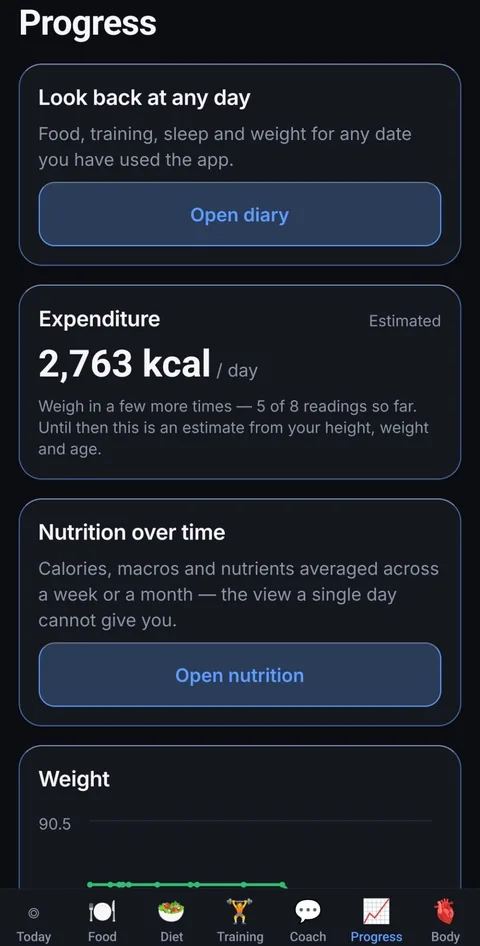
Progress
Your real expenditure, worked out from weight trend against intake — and until there is enough of it, exactly how many weigh-ins are still needed. It tells you when it does not know yet.
Nutrition
Fibre, sugar, saturated fat, sodium and thirteen vitamins and minerals — every one saying how many of the day’s foods it was built from, rather than treating what it does not know as zero.
Training
Every working set counted per muscle across the week, with assisting muscles counted as half.
Body
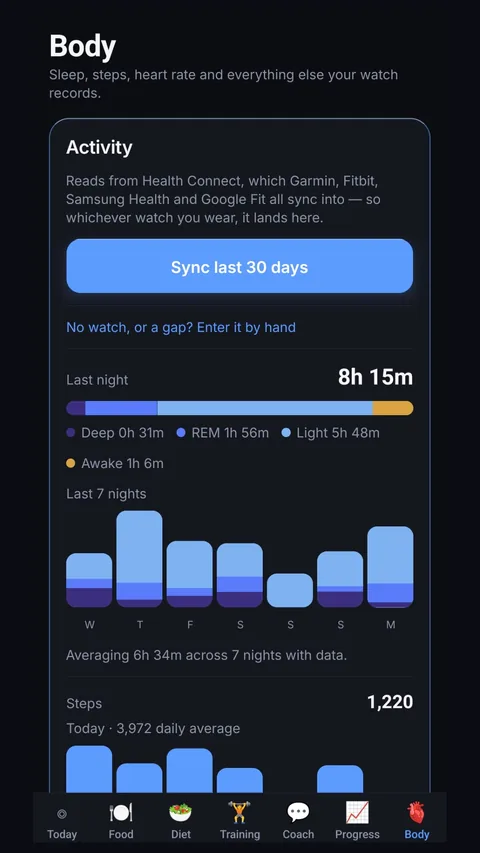
Sleep stages, resting heart rate, HRV, blood oxygen, respiration, VO2 max and your weight straight off the scale. Shown for context, never added to your calorie target.
How it works
Four steps, then it runs itself
Nothing here asks you to be disciplined. It asks you to weigh in and log, and it does the
arithmetic that people give up on.
1
Tell it your goal
Lose, maintain or gain, then pick a pace: gentle, steady, fast or aggressive. Each shows
the calorie figure and the rough weekly rate before you commit. Nothing ever drops below what your
body burns at rest. Already have a number you trust? Type it in and it uses that.
2
Get meals that fit it
A plan built to your exact target, respecting allergies, food you dislike and a weekly
grocery budget, with a shopping list attached. Every ingredient says whether it is
weighed raw or cooked. Or skip the plan entirely and log your own meals — the targets
work the same either way.
3
Eat, and log it however
One tap from your plan, or from a meal you have saved. Or a photo, a sentence, a barcode,
a search. Went off-plan? That is the interesting case: the rest of the day resizes so it
still lands on target, and tells you the new weights in grams.
4
It corrects itself
After a fortnight it stops trusting the formula and starts trusting your data. Your
weight trend against your intake gives your real expenditure, and your target follows
it — so a stall gets fixed instead of blamed on you.
Why bother switching
Counting is the easy part
Every tracker can add up what you ate. The question is what happens next, and for most of
them the answer is nothing — you are handed a number and left to work out dinner yourself.
It answers “so what do I eat?”
“603 calories left” is not an instruction. Setpoint says 180 g of chicken,
95 g of rice, and the number moves the moment you log something that was not in the
plan. Most apps stop at the first half.
An off-plan lunch is not a ruined day
Eat the thing. The remaining meals shrink or grow to absorb it, protein is protected
first, and the day still lands on your target. That is the difference between a plan
you follow and a plan you abandon by Wednesday.
Australian food, Australian data
Whole foods come from the official Food Standards Australia New Zealand database — the
cuts sold here, and entries that say raw, baked, fried or casseroled. Weighing cooked
chicken against raw figures undercounts you by nearly a fifth, and most apps never
mention which one you are looking at.
Vitamins and minerals, and how much of them it knows
Thirteen of them — iron, calcium, B12, folate, zinc and the rest — from the same
Australian database, for meals out of your plan as well as anything you search or scan.
Every figure says what it was built from: from 5 of 7 foods logged. Other apps
draw a tidy ring per nutrient, which can only be filled by counting “not
recorded” as zero — and a total built that way reads low and reads confident.
Ours is less tidy, and does not mislead you.
The AI never invents a number
A model identifies the food and estimates the portion. Every macro figure comes from a
nutrition database. If nothing matches, the item is flagged as an estimate rather than
quietly counted as fact.
It notices when your expenditure moves
A fall in expenditure caused by being lighter is normal arithmetic. A fall beyond that
is worth knowing about, and Setpoint separates the two so you can see which you are
looking at rather than assuming the worst.
Training that remembers for you
Last session's reps and weights are already in the boxes. Change one digit to beat it.
A rest timer sits under every lift, set to that lift's own rest period.
The difference
It learns what you actually burn
The Mifflin–St Jeor equation is a population average. For an individual it can be out by
several hundred calories a day, which is the difference between losing half a kilo a week
and losing nothing at all.
After a couple of weeks, Setpoint has something better than an average: you. It fits a
trend line through your weigh-ins, compares it against what you ate, and reads your
expenditure straight off the energy balance.
Until there is enough data it says so plainly, and blends toward the figure your data points to as
the evidence builds, rather than lurching one morning and quietly changing your targets.
How the estimate settles
Week 1Formula only
Week 2Blending
Week 4Measured
A mistyped weight cannot move it. Physically impossible results are rejected, not averaged in.
Logging
Log your food nine ways
The app identifies the food. A nutrition database supplies the numbers.
Nothing ever invents a calorie count. Alongside the five below, you can log a meal
straight from your plan in one tap, log one of your own saved meals just as fast,
re-log anything you have eaten before, or type your own figures for a recipe only
you make.
🎙️
Say it
“Two eggs and three rashers of bacon.” Speech is transcribed on your phone, so no audio
ever leaves the device. It becomes a list of items with portions you confirm, and the
transcript stays editable, so a misheard word is a one-word fix rather than a re-recording.
📷
Photograph it
Point the camera at your plate. Every component comes back separately, each with an
honest confidence rating. Got one wrong? Correct it against the food database and the
macros change with the name, not just the label.
📊
Scan it
Barcodes against Open Food Facts and USDA Branded, including Australian supermarket
products. Anything missing, save as your own.
🔍
Search it
Australian whole foods from the official Food Standards Australia New Zealand database —
where every second entry says whether it is raw, baked, fried or casseroled, because
chicken carries half again as much protein per 100 g once it leaves the pan. Plus USDA,
branded products from Open Food Facts, and every food you have saved.
🍺
Drinks, properly
Alcohol counted as standard drinks, not just calories, because the number that matters
for a night out is not kilojoules.
💬
A coach, and a helper
Coach answers questions about your own numbers — why your target moved, whether a
plateau is real. SET is the other one: ask it how anything in the app works and it
walks you through it, step by step, instead of sending you to a support inbox.
🎚️
Your pace, your number
Four speeds — gentle, steady, fast, aggressive — layered on top of your goal rather than
replacing it, so a cut always sits below steady fat loss at whichever pace you pick. You
see the calorie figure and the rough weekly rate for each before you commit, not after a
fortnight of wondering. Already have a number you trust from somewhere else? Put
it in and Setpoint will use that instead. Nothing drops below what your body burns at
rest, whatever you choose.
🛒
Meal plans
Hit your targets exactly, respect allergies and a weekly grocery budget, and arrive with
a shopping list attached. Every ingredient says whether it is weighed raw or cooked,
because chicken is a fifth lighter on the way out of the pan. Rebuild the plan whenever
you like, keeping any meals you want to eat again.
⚖️
What to weigh, tonight
Not just how many calories are left — how many grams of each thing, across the meals you
have not eaten yet, adjusted for the ones you have. Lunch ran over? Dinner's numbers have
already moved.
🥣
Save a meal, log it in one tap
The breakfast you eat every weekday should not cost four searches every weekday. Log it
once, save it, and it is a single tap after that — with the same portions and the same
vitamins and minerals it had the first time.
📌
Keep the meals you actually like
Found a breakfast you want every day? Pin it, and the next plan is written around it —
your lunch and dinner are built to whatever calories and protein are left, so the day
still lands on target. The pinned meal comes back exactly as you saved it, down to the
gram.
🙋
Or no meal plan at all
Not everyone wants to be told what to eat. Turn meal plans off and log your own food
instead. Your calorie and macro targets stay exactly as they are, and Setpoint still
shows what is left of them across the meals you have not had yet.
Groceries
Tell it what you can spend
Set a weekly food budget and the plan is built inside it. Not a plan you then discover you
cannot afford — a plan costed as it is written, from prices in the country you actually
shop in.
The shopping list comes with it. Every ingredient across every day of the plan, added up
into one quantity and grouped the way a shop is laid out, so you buy 2.4 kg of chicken
thigh once rather than finding it on six separate days.
Change a meal and the list rebuilds itself. A plan that hits your macros exactly and then
sends you back to the shops twice is a plan people abandon in the second week.
Meat & seafood
Chicken thigh, skinless2.4 kg
Beef mince, 15% fat1.9 kg
Salmon fillet600 g
Dairy & eggs
Eggs2 dozen
Parmesan250 g
Butter250 g
Produce
Broccoli1 kg
Baby spinach400 g
Cos lettuce3 heads
Pantry
Olive oil500 ml
Estimated for the weekA$168
Why cuts stall
Know when your expenditure has moved
Somewhere around week six, a lot of diets slow down. Most people conclude they have lost
discipline, eat less, and stall harder. Often what has changed is their expenditure —
partly because a lighter body costs less to run, and sometimes by more than that alone
explains.
Setpoint works out your expenditure twice, once at the start and once now, then subtracts
the part explained by simply being lighter. A smaller body costs less to run. That is
arithmetic, not adaptation. What is left over is a change worth knowing about, and it is
one no app built on a formula can see, because a formula only moves when your weight does.
Seeing it is the point. A stall you can name is a different problem from a stall you
blame yourself for.
WEEK 9
2,640→2,430kcal / day
Your expenditure has fallen further than expected
Your expenditure has fallen 130 kcal beyond what losing 5.4 kg accounts for. A drop
like this can reflect training, daily movement, stress, sleep or how closely the
logging matched the eating — not only metabolic adaptation. Setpoint shows you the
change and what it is not explained by; what to do about it is a conversation for you
and, if it persists, someone qualified.
Needs about eight weeks of logging before it can compare two windows.
Training
See your whole training week at once
A programme is a list of exercises until you ask the only question that matters: am I
doing enough of everything, and too much of anything?
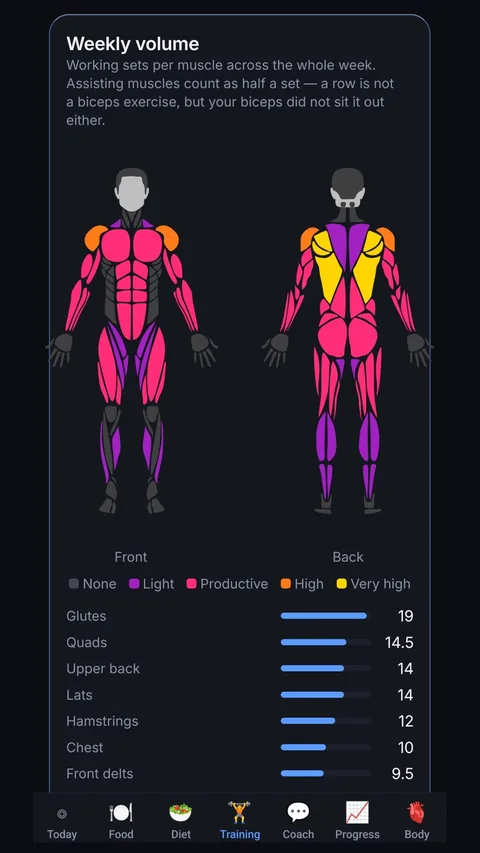
Setpoint adds up your working sets across the whole week and attributes them to the
muscles that did the work. Assisting muscles count as half a set, because a row is
not a biceps exercise but your biceps did not sit it out either.
Twenty-two sets of chest next to four of hamstrings is obvious in a glance.
Open any exercise and the same figure shows that lift on its own — what it trains, and
what merely assists.
NoneLightProductiveHighVery high
In the gym
Beat last week without having to remember it
Open a lift and last session's reps and weights are already in the boxes. Tap the set
number to record the same again, or change one digit to beat it. That is progressive
overload, and it is most of the reason to write anything down at all.
A rest timer sits under every exercise, already set to that lift's own rest period. Tap
the minutes or the seconds to change them.
Nothing is guessed on your behalf: a prefilled row is only saved once you confirm it, so
a session you skipped never quietly records last week's work as this week's.
Notes and corrections
Nothing you log is final
Every day takes a note, and so does every session — whether a meal was worth repeating,
whether a knee complained on the second set. Two boxes, because they are two different
questions.
Mistyped a weigh-in? Correct it. Logged a session before you remembered your numbers?
Edit it, or delete it. One fat-fingered weight drags a trend line for a fortnight, so it
has no business being permanent.
Your watch
Your watch data, handled honestly
Apple Health and Health Connect, so Garmin, Fitbit, Samsung Health and Google Fit all
land in one place. Sleep and its stages, steps, distance, floors, workouts, resting
heart rate, average and peak heart rate, heart rate variability, blood oxygen,
respiration, VO2 max and water — on the devices that share them, which is not every
watch.
Step on a connected scale and your weight is already in, with body fat and lean mass
where the scale measures them. That is not a convenience: your expenditure is worked
out from the weight trend, so a weigh-in you never got round to typing is a hole in the
number everything else is built on. A weight you enter by hand always wins over the
scale for that day — correct it once and it stays corrected.
Most trackers read your weight and your steps and stop there. This is deliberately more,
because the numbers are already on your wrist.
Activity is shown for context and deliberately never added to your
calorie target. Wearables overestimate calorie burn by 20–50%, and adding that to your
allowance is how people eat back a deficit they never had.
Privacy
Your data stays yours
Your food log, weight and plans are visible only to you. That is enforced at the database
level, not by the app being polite about it.
No ads. Nothing sold to anyone. Nothing used to train models. Delete your account from
inside the app and everything goes with it, permanently.
What testers say
Reviews from people using it
Written by testers, in their own words. Nothing appears here until it is checked.
Loading…
Used Setpoint? Say what you think
Half stars are allowed, because “good but not perfect” is a real answer.
iPhone
Not on iOS yet
Setpoint is one app, built to run on both. Android came first because that is what got it into
people's hands soonest. Leave your email and you will get one message, on the day it lands on
the App Store, and nothing else.
Pricing
One subscription. Everything in it.
Seven days free, on every plan. Cancel inside the
trial and you are not charged — Google handles that, from your Play Store subscriptions,
not from us.
No tiers, no add-ons, no ads, no upsells.
MONTHLY
A$19.99 / month
Seven days free
Everything, from day one
Cancel any time
Save 33%
6 MONTHS
A$79.99 / 6 months
Seven days free
Everything, from day one
Works out at A$13.33 a month
Save 42%
YEARLY
A$139.99 / year
Seven days free
Everything, from day one
Works out at A$11.67 a month
One subscription. That is the whole pricing page.
No free tier that withholds the useful half. No “pro” version on top of the paid
version. No credits to top up, no add-ons, no ads, and nothing that costs extra the month
you actually need it. Every feature described on this page is in both plans from the first
day.
Prices in Australian dollars. The App Store and Google Play convert to your local currency and
handle billing; Setpoint never sees your card.
Questions
How is this different from other tracking apps?
Three things. Your calorie target adapts to what your body actually does, rather than
staying wherever a sign-up formula put it on day one. There are no ads and no upsells, just
one subscription with everything in it. And no number in the app is invented: a model may
identify food from a photo or a sentence, but every macro figure comes from a nutrition
database or from a food you entered yourself.
Is there an iPhone version?
Not yet. Setpoint is Android only at the moment. It is built from a single codebase that
already targets both, so an iOS release is a matter of finishing store requirements rather
than rewriting the app.
How long before it knows my expenditure?
Around two weeks of weigh-ins and food logging gets a first blended estimate; four weeks of
reasonably consistent logging gets a figure that no longer leans on the formula at all.
Until then the app tells you exactly what it is working from and what it still needs.
Do I have to log perfectly?
No, but you do have to log consistently. The expenditure figure is derived from what you
record, so it inherits any systematic under-logging. Being roughly right every day beats
being exactly right three days a week.
Does the AI make up calorie numbers?
Never. A model is used to identify food from a photo or a sentence and to estimate portion
size. Every macro figure comes from the Australian Food Composition Database, USDA or Open
Food Facts, or from a food you entered yourself. If nothing matches, the item is flagged as
estimated so you know.
Is this medical advice?
No. Setpoint is a tracking tool. If you have a health condition, are pregnant, or are
recovering from an eating disorder, talk to a GP or an accredited practising dietitian.
Stop guessing what you burn.
Two weeks of honest logging is all it takes to start replacing a formula with your own data.